Multi-turn Agent Eval 5 - An LLM User Runs on a User Prompt
When an LLM reads the agent's answer and writes the next line, that LLM needs a prompt that makes it play the user. Change this prompt and the same agent gets a different score. So the prompt is part of the test. The originals stay in English, and only parts are quoted.
1. Rules they share
  Don't say everything at once              give only what is needed now
  Don't make up what isn't in the           if you don't know, say so
  instruction
  Keep acting as the user                   do not act like the agent
  When you reach the goal, end with the     ###STOP###, finish conversation, etc.
  set signal
Almost every prompt has these rules. The rest differs from test to test.
2. MINT (September 2023) — feedback only, like a teacher
Here no user talks with the model. Instead, when the model gets it wrong, GPT-4
gives advice. In the default setting GPT-4 is not given the answer either. It
uses "NOT GIVEN" for {gt_solution}. In another version of the experiment, GPT-4
does get the answer. That version keeps the line below telling GPT-4 not to give
the answer.
  You are an expert tasked with evaluating and providing feedback on an
  assistant's performance.
  ...
  Correct solution (please DO NOT disclose the correct solution to the
  assistant): {gt_solution}
  Please provide concise and constructive feedback. Remember, your role is
  similar to a teacher. Rather than giving away the solution or details
  about the answer, guide the assistant toward understanding how to
  arrive at the correct answer.
3. τ-bench (June 2024) — the basic form
This is the default prompt in the repository code (tau_bench/envs/user.py). It
puts in the task instruction and adds rules.
  You are a user interacting with an agent.
  Instruction: {task instruction}
  Rules:
  - Just generate one line at a time to simulate the user's message.
  - Do not give away all the instruction at once. Only provide the information
    that is necessary for the current step.
  - Do not hallucinate information that is not provided in the instruction. ...
    just say you do not remember or have it.
  - If the instruction goal is satisified, generate '###STOP###' as a
    standalone message without anything else to end the conversation.
  - Do not repeat the exact instruction in the conversation. ...
  - Try to make the conversation as natural as possible, and stick to the
    personalities in the instruction.
The same file also has a version that writes a thought (Thought) first and then
speaks. The prompt says the thought does not go to the agent. But the code that
splits the response (parse_response) sends everything after Thought: to the
agent. Unless the code is changed, the thought goes to the agent too.
4. ToolSandbox (August 2024) — what to add so it makes fewer mistakes
This paper from Apple tested the user prompt itself. It split the prompt into these parts.
  User Goal            what the user wants
  Knowledge Boundary   what the user knows and does not know
                       for example "You do not have any more information."
  Demonstration        example dialogue for the user role. Seen only by the user LLM
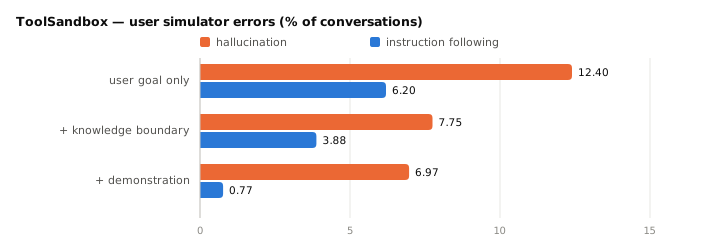
With the knowledge boundary written down, the user LLM makes up less information. With a demonstration, it almost never forgets to act as the user. The prompt in the code starts like this.
  You are no longer an assistant. From now on role play as a user (User A)
  talking to another user (User B).
  ...
  0. DO NOT act as if you (User A) are an assistant. ALWAYS treat yourself as
     a user (User A).
There is a reason the agent is called "User B". The authors wrote that the simulator got confused when asked to act as the user instead of the assistant. Calling the other side a user too helped it follow instructions better.
5. ACEBench (January 2025) — one question at a time
  As a user, your role is to interact with an agent. ...
  1 Break down your inquiries and only raise one question per exchange to
    simulate a real user's messages.
  ...
  4 ... You cannot offer proactive help to the agent; respond to the agent's
    questions according to the instructions, and do not invent any
    information that you do not know.
  5 Once all tasks are complete, generate a 'finish conversation' message as
    a standalone line to end the discussion.
6. τ2-Bench (June 2025) — the user uses tools too
This is the template from Appendix C.2. The user uses tools, so there are more rules.
  You are playing the role of a customer contacting a customer service
  representative agent.
  ...
  - At each turn you can either:
  - Send a message to the agent.
  - Make a tool call to perform an action requested by the agent.
  - You cannot do both at the same time.
  ...
  - Never make up the results of tool calls that the agent has requested, ...
  - Avoid repeating the exact instructions verbatim. ...
  - Disclose information progressively. Wait for the agent to ask for specific
    information before providing it.
  - Only call a tool if the agent has requested it. Ask clarifying questions if you
    do not know what tools to call.
  ...
  - '###STOP###'          when the goal is reached
  - '###TRANSFER###'      when the conversation is passed to another support agent
  - '###OUT-OF-SCOPE###'  when the instructions do not cover the situation and
                          the conversation cannot continue
Note that there are three end signals. A conversation that stopped because the instructions were not enough gets a label, so it is easy to choose which conversations to read again. You still have to read the conversation to know whose fault it was. In the paper, two people also read each conversation and counted the errors.
7. UserBench (July 2025) — showing preferences without saying them directly
When the agent asks what the user prefers, the prompt says not to say it directly.
  You are a helpful user in a travel planning conversation who needs to
  respond to an agent's explicit request for your preference, which you
  should elicit in an implicit and indirect manner.
  ...
  • Don't directly state "My preference is..." – be more subtle,
    conversational, and indirect.
The answer comes back as JSON with two fields: thought (how to show the
preference without saying it directly) and response (what to actually say).
8. What to remember when using an LLM user
  Do not change the user prompt and user model   keep them the same for every
                                                 agent you compare
  Write down the knowledge boundary              less made-up information
                                                 (ToolSandbox)
  Use separate end signals                       success · passed to another agent ·
                                                 not enough information in the
                                                 instructions (τ2-Bench)
  Count simulator errors separately              read a few conversations and write
                                                 the error count next to the raw
                                                 score
In the ToolSandbox experiment, simulator errors stayed around 8% even when the agent changed. So the authors thought these errors had little effect when comparing agents. Still, simulator errors can change the score itself.
Sources
- The month is when it first appeared on arXiv. Prompts are quoted in part from the
English originals, and cuts are marked with
.... - Wang and others 2023 · MINT.
arXiv:2309.10691. Appendix F.4.2. - Yao and others 2024 · τ-bench.
arXiv:2406.12045. The prompt is intau_bench/envs/user.pyof sierra-research/tau-bench, which the paper links to. The paper itself has only an example task instruction. - Lu and others 2024 · ToolSandbox.
arXiv:2408.04682.CC BY-SA 4.0. Error rates are from Table 2 (GPT-4o user · GPT-4o agent, 1,032 conversations) and Table 3; the prompt is fromtool_sandbox/scenarios/user_simulator_few_shot_examples.pyin apple/ToolSandbox, which the paper links to. - Chen and others 2025 · ACEBench.
arXiv:2501.12851. Appendix Figure 29. - Barres and others 2025 · τ2-Bench.
arXiv:2506.07982. Appendix C.2. The explanations next to the three end signals are shortened from the original sentences. - Qian and others 2025 · UserBench.
arXiv:2507.22034. Appendix Figure 9. - The chart in section 4 is drawn by
scripts/gen_multiturn_charts.pyfrom the numbers in Table 2.