Cypher 1 - Writing the Picture Down
The language you use to ask Neo4j questions is Cypher. SQL works on tables; Cypher works on a picture made of nodes and edges.
So a query looks like the picture. Three symbols are the whole thing.
  ( )       node
  -[ ]->    edge
  { }       property
This post goes through the three, one at a time. Post 2 uses them to find long paths.
1. Node — ( )
One person, one shop: that is a node. Inside the brackets you can write two things.
  ( )            any node
  (:Person)      a node of type Person
  (f)            one node. I will call it f later
  (f:Person)     a node of type Person. I will call it f later
:Person is called a label, but just read it as the type. The f in
front is the name tag. Add one only when you want to return it or use it
again; otherwise leave it out.
2. Edge — -[ ]->
It joins two nodes. It has a direction.
  -[:KNOWS]->    follow a KNOWS edge forwards
  <-[:KNOWS]-    backwards
  -[:KNOWS]-     direction does not matter. Follow it either way
  -[r:KNOWS]->   an edge can have a name tag too
The direction-free form matters. You may have stored
(student)-[:TRAINED_UNDER]->(teacher) in one direction only, but if you write
- when searching, you can also walk from the teacher back to the student.
3. Property — { }
Both nodes and edges carry values.
  (p:Person {name: 'Mina'})      a Person whose name is 'Mina'
  -[:KNOWS {since: 2019}]->      a KNOWS edge whose since is 2019
4. Find it, return it — MATCH and RETURN
Say four people are joined like this.
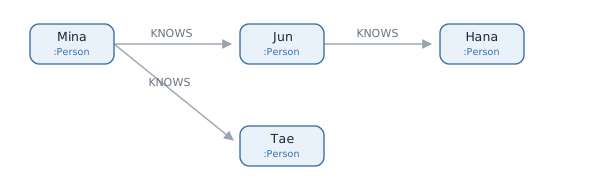
Find Mina's friends.
MATCH (me:Person {name: 'Mina'})-[:KNOWS]->(f:Person)
RETURN f.name
f.name
"Jun"
"Tae"
Line by line.
  MATCH          find this shape.  SQL's SELECT ... WHERE slot
  RETURN         which of the things found to hand back
  f.name         the name property of the node tagged f
Writing the shape as a picture is the difference. The line above does what
your eye does when it follows the arrows out of Mina.
5. Two steps
Join one more arrow.
MATCH (me:Person {name: 'Mina'})-[:KNOWS]->(:Person)-[:KNOWS]->(fof:Person)
RETURN fof.name
fof.name
"Hana"
The (:Person) in the middle has no name tag. It is only passed through and
never returned, so it is left empty.
Tae is not in the result. No KNOWS edge leaves Tae, so the picture stops
there.
6. Rename, sort, cut
MATCH (me:Person {name: 'Mina'})-[:KNOWS]->(f:Person)
RETURN f.name AS friend
ORDER BY friend
LIMIT 2
friend
"Jun"
"Tae"
  AS friend      rename the result column to friend
  ORDER BY       sort
  LIMIT          only this many from the top
ORDER BY, LIMIT and AS work as they do in SQL. Without ORDER BY the
row order is not guaranteed. The results in the earlier sections could come
back in another order too.
7. You can write several MATCH clauses
MATCH (me:Person {name: 'Mina'})-[:KNOWS]->(f:Person)
MATCH (f)-[:LIVES_IN]->(c:City)
RETURN f.name, c.name
A name tag stays alive to the end of the query. The f from the first line
is used again on the second.
One thing to watch: adding a MATCH changes the row count. For each row so
far, you get as many rows as there are matches for the next shape — a row
with no match disappears, and a row with three matches becomes three.
That is because the second MATCH above is tied to the first through f.
An untied shape behaves differently.
MATCH (f:Person)
MATCH (c:City)
Three people and four cities now give every pairing, 12 rows. When you
chain many of them, cut down in the middle with WITH ... LIMIT or DISTINCT.
Writing WITH f, c means only f and c survive after that point.
8. Values come from outside
MATCH (me:Person {id: $userId})-[:KNOWS]->(f:Person)
RETURN f.name
$userId is a value supplied when the query is called. Rather than baking
the name into the query, you leave the slot open.
9. Lists, and the | symbol
Cypher hands back lists often, and there is a syntax for transforming one in a single step.
[x IN list | expression]
It is Python's [expression for x in list] with the two halves swapped.
Run it and you get this.
RETURN [n IN [1, 2, 3] | n * 10] AS tenfold
tenfold
[10, 20, 30]
n is each item taken from the list, and what follows | is what to turn
it into.
| means two things
The same symbol does different work in different places. They are easy to confuse, so here they are side by side.
  [x IN list | expr]   inside a list:  "turn each one into this"
  -[:A|B]->            inside an edge: "A or B"
The second one says follow either a KNOWS or a WORKS_WITH, whichever.
MATCH (me:Person {name: 'Mina'})-[:KNOWS|WORKS_WITH]->(f:Person)
RETURN f.name
People reached by KNOWS and people reached by WORKS_WITH all come back.
And when you add *
You meet this shape in post 2. Split into pieces, none of it is new.
  [:A|B|C*1..3]

  [: ... ]        the edge slot
  A|B|C           A or B or C
  *1..3           one to three edges along the way
The number after the star counts edges, not nodes. Cross two edges and you step on three nodes.
  (X) --A--> (Y)                1 edge.   right next door
  (X) --A--> (Y) --C--> (Z)     2 edges.  one house further
So read that number as distance. *1..3 means "whatever sits at distance
1 to 3".
And the star covers all the types at once. You may mix the three as you go
— the second line above, one A then one C, is caught at distance 2.
A line starting with // is a comment.
Next
Two steps means writing -[:KNOWS]-> twice. But what if you do not know how
many steps? It might be one, it might be three.
That is where post 2 starts.