Multi-turn Agent Eval 5 - LLM 사용자 시험에는 사용자 역 프롬프트가 들어갑니다
agent 의 답을 보고 다음 말을 하는 상대가 LLM 이면, 그 LLM 에게 사용자 역을 시키는 프롬프트가 있습니다. 이 프롬프트가 달라지면 같은 agent 라도 점수가 달라지니, 프롬프트도 시험의 일부입니다. 원문은 영어 그대로 두고 일부만 옮깁니다.
1. 공통으로 들어가는 규칙
  한꺼번에 다 말하지 마라            지금 필요한 것만 준다
  지시에 없는 건 지어내지 마라        모르면 모른다고 한다
  사용자 역에서 벗어나지 마라         agent 처럼 굴지 않는다
  목표를 이루면 정해진 신호로 끝내라   ###STOP###, finish conversation 등
거의 모든 프롬프트에 이 규칙들이 들어 있습니다. 나머지는 시험마다 다릅니다.
2. MINT (2023년 9월) — 선생님처럼 피드백만 준다
사용자가 대화하는 게 아니라, 모델이 틀리면 GPT-4 가 조언을 줍니다. 기본 설정에서는
GPT-4 에게도 정답을 주지 않고, {gt_solution} 자리에 "NOT GIVEN" 이 들어갑니다. 정답을
주는 변형 실험에서는 정답을 말하지 말라는 아래 줄이 그대로 쓰입니다.
  You are an expert tasked with evaluating and providing feedback on an
  assistant's performance.
  ...
  Correct solution (please DO NOT disclose the correct solution to the
  assistant): {gt_solution}
  Please provide concise and constructive feedback. Remember, your role is
  similar to a teacher. Rather than giving away the solution or details
  about the answer, guide the assistant toward understanding how to
  arrive at the correct answer.
3. τ-bench (2024년 6월) — 가장 기본형
저장소 코드(tau_bench/envs/user.py)의 기본 프롬프트입니다. 과제 지시를 끼워 넣고
규칙을 붙입니다.
  You are a user interacting with an agent.
  Instruction: {과제 지시}
  Rules:
  - Just generate one line at a time to simulate the user's message.
  - Do not give away all the instruction at once. Only provide the information
    that is necessary for the current step.
  - Do not hallucinate information that is not provided in the instruction. ...
    just say you do not remember or have it.
  - If the instruction goal is satisified, generate '###STOP###' as a
    standalone message without anything else to end the conversation.
  - Do not repeat the exact instruction in the conversation. ...
  - Try to make the conversation as natural as possible, and stick to the
    personalities in the instruction.
같은 파일에 먼저 생각(Thought)을 쓰고 말하게 하는 판도 있습니다. 프롬프트는 생각이
agent 에게 가지 않는다고 적었는데, 응답을 자르는 코드(parse_response)는 Thought:
뒤를 통째로 넘깁니다. 그대로면 생각까지 agent 에게 갑니다.
4. ToolSandbox (2024년 8월) — 무엇을 넣어야 덜 틀리나
Apple 의 이 논문이 사용자 프롬프트 자체를 실험했습니다. 프롬프트를 이렇게 나눴습니다.
  User Goal            무엇을 원하는지
  Knowledge Boundary   무엇을 알고 무엇을 모르는지
                       예: "You do not have any more information."
  Demonstration        사용자 역 대화 예시. 사용자 LLM 에게만 보인다
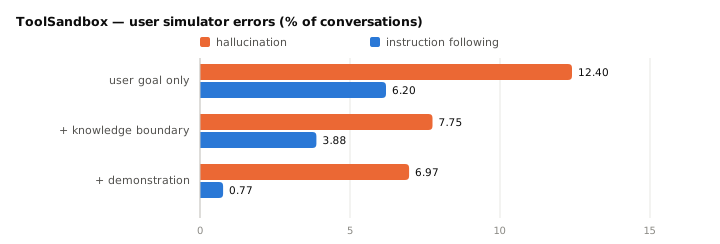
아는 것의 경계를 적으면 지어내기가 줄고, 예시 대화를 주면 사용자 역을 잊는 일이 거의 없어집니다. 코드의 프롬프트는 이렇게 시작합니다.
  You are no longer an assistant. From now on role play as a user (User A)
  talking to another user (User B).
  ...
  0. DO NOT act as if you (User A) are an assistant. ALWAYS treat yourself as
     a user (User A).
agent 를 "User B" 라고 부른 데는 이유가 있습니다. 역할을 뒤집는 걸 시뮬레이터가 헷갈려 해서, 상대도 사용자라고 하니 지시를 더 잘 따랐다고 적었습니다.
5. ACEBench (2025년 1월) — 한 번에 질문 하나
  As a user, your role is to interact with an agent. ...
  1 Break down your inquiries and only raise one question per exchange to
    simulate a real user's messages.
  ...
  4 ... You cannot offer proactive help to the agent; respond to the agent's
    questions according to the instructions, and do not invent any
    information that you do not know.
  5 Once all tasks are complete, generate a 'finish conversation' message as
    a standalone line to end the discussion.
6. τ2-Bench (2025년 6월) — 사용자가 tool 도 쓴다
부록 C.2 의 템플릿입니다. tool 을 쓰는 사용자라 규칙이 늘었습니다.
  You are playing the role of a customer contacting a customer service
  representative agent.
  ...
  - At each turn you can either:
  - Send a message to the agent.
  - Make a tool call to perform an action requested by the agent.
  - You cannot do both at the same time.
  ...
  - Never make up the results of tool calls that the agent has requested, ...
  - Avoid repeating the exact instructions verbatim. ...
  - Disclose information progressively. Wait for the agent to ask for specific
    information before providing it.
  - Only call a tool if the agent has requested it. Ask clarifying questions if you
    do not know what tools to call.
  ...
  - '###STOP###'          목표를 이뤘을 때
  - '###TRANSFER###'      다른 상담원에게 넘겨졌을 때
  - '###OUT-OF-SCOPE###'  지시에 없는 상황이라 더 이어갈 수 없을 때
끝내는 신호가 셋으로 나뉜 게 눈에 띕니다. 지시가 모자라 멈춘 대화에 표시가 남으니 다시 읽을 대화를 고르기 쉽습니다. 누구 탓인지는 여전히 대화를 읽어야 압니다. 논문도 오류는 대화마다 두 사람이 읽고 셌습니다.
7. UserBench (2025년 7월) — 선호를 은근히 흘린다
agent 가 선호를 물었을 때 대놓고 말하지 말라고 합니다.
  You are a helpful user in a travel planning conversation who needs to
  respond to an agent's explicit request for your preference, which you
  should elicit in an implicit and indirect manner.
  ...
  • Don't directly state "My preference is..." – be more subtle,
    conversational, and indirect.
답은 thought(어떻게 은근히 드러낼지)와 response(실제로 할 말) 두 칸의 JSON
으로 받습니다.
8. 쓸 때 기억할 것
  사용자 프롬프트와 사용자 모델을 고정한다      비교하려는 agent 모두에 똑같이
  아는 것의 경계를 적는다                       지어내기가 준다 (ToolSandbox)
  끝내는 신호를 나눈다                          성공 · 넘김 · 지시 부족 (τ2-Bench)
  시뮬레이터 오류를 따로 센다                    대화를 몇 개 읽고, 원점수 옆에 적는다
ToolSandbox 실험에서는 agent 를 바꿔도 시뮬레이터 오류가 8% 안팎으로 비슷했고, 저자들은 그래서 agent 끼리의 비교에는 영향이 작다고 봤습니다. 다만 점수의 절대값은 시뮬레이터 오류의 영향을 받을 수 있습니다.
출처
- 연월은 arXiv 에 처음 올라온 달입니다. 프롬프트는 영어 원문에서 일부만 옮겼고, 자른
곳은
...로 표시했습니다. - Wang 외 2023 · MINT.
arXiv:2309.10691. 부록 F.4.2. - Yao 외 2024 · τ-bench.
arXiv:2406.12045. 프롬프트는 논문이 링크한 sierra-research/tau-bench 의tau_bench/envs/user.py에 있습니다. 논문 본문에는 과제 지시 예시만 있습니다. - Lu 외 2024 · ToolSandbox.
arXiv:2408.04682.CC BY-SA 4.0. 오류율은 Table 2(GPT-4o 사용자 · GPT-4o agent, 대화 1,032개)와 Table 3, 프롬프트는 논문이 링크한 apple/ToolSandbox 의tool_sandbox/scenarios/user_simulator_few_shot_examples.py입니다. - Chen 외 2025 · ACEBench.
arXiv:2501.12851. 부록 Figure 29. - Barres 외 2025 · τ2-Bench.
arXiv:2506.07982. 부록 C.2. 끝내는 신호 셋에 붙인 우리말 설명은 원문 문장을 줄인 것입니다. - Qian 외 2025 · UserBench.
arXiv:2507.22034. 부록 Figure 9. - 4절의 차트는 Table 2 의 숫자로
scripts/gen_multiturn_charts.py가 그립니다.